
AI Skin Tone Changer: Perfect Your ComplexionFlawless Skin, Instantly
Effortlessly adjust, correct, or completely change the skin tone in your photos. Our AI ensures natural, realistic results, whether you want a subtle tan, a lighting correction, or a creative fantasy look.
Skin Tone Transformations
See how our AI can subtly enhance or completely transform the skin in any photo.
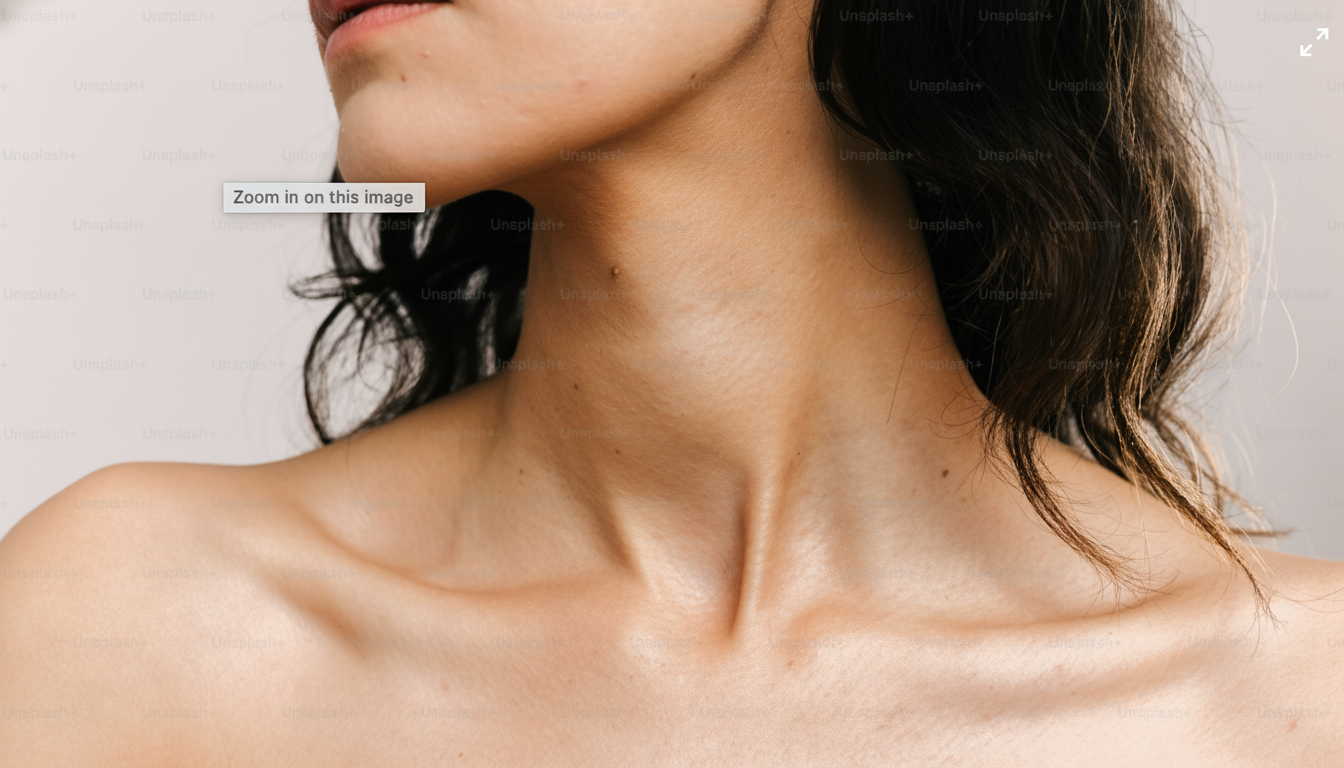
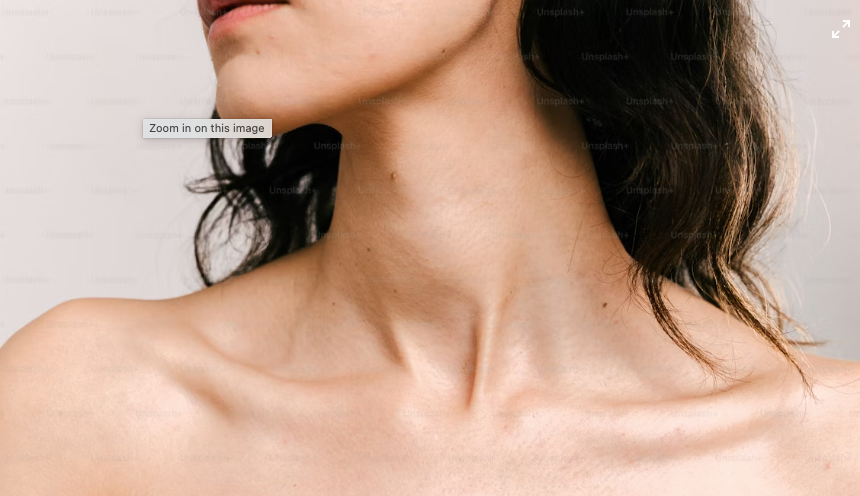
PRESERVATION INSTRUCTIONS: Preserve facial features, identity, hair, eyes, lips, clothing, and background completely. ONLY change the skin color/tone. Do NOT modify any other elements. SKIN TONE TRANSFORMATION: Target Skin Tone: warmer tanned sun-kissed golden bronze skin Transformation Intensity: moderate natural 30-50 percent tone transformation SKIN TONE CHANGE REQUIREMENTS: - Transform skin to warmer tanned sun-kissed golden bronze skin tone - Apply moderate natural 30-50 percent tone transformation intensity transformation - CRITICAL: Only change skin areas (face, neck, hands, arms, visible body skin) - PRESERVE: Hair color, eye color, lip color, eyebrow color completely unchanged - PRESERVE: Clothing, accessories, background completely unchanged - Maintain natural skin texture, pores, and details - Smooth gradual color transition across all skin areas - Consistent tone across face, neck, and all visible skin - Natural undertones and color harmony - Realistic lighting interaction with new skin tone - Professional retouching quality - No color bleeding into hair, eyes, or clothes - Natural shadows and highlights on skin - Believable realistic skin color result

Why Edit Skin Tones with AI?
Achieving a perfect and consistent skin tone is one of the most challenging parts of photo editing. Our AI simplifies the process, intelligently detecting skin areas and applying changes with stunning realism.
Natural-Looking Adjustments
Our AI understands the nuances of skin pigmentation, undertones, and lighting to ensure all changes look completely natural.
Precise Skin Detection
Automatically detect and isolate all skin areas in a photo, so changes are applied only where you want them, without tedious manual masking.
Creative & Fantasy Colors
Go beyond reality. Experiment with fantasy skin tones for character design, cosplay photos, or artistic projects.
Achieve Picture-Perfect Portraits
Correcting and enhancing skin tones can dramatically improve the quality and impact of your photos.

Advanced Skin Retouching Features
Our tool is more than just a color changer; it’s a complete skin enhancement studio.
Automatic Redness Reduction
The AI can automatically detect and neutralize red blotches or sunburn for a more even and healthy-looking complexion.
Undertone Correction
Fine-tune the warm (yellow/orange) or cool (pink/blue) undertones of the skin for perfect color harmony.
Maintain Skin Texture
Our AI preserves natural skin texture, including freckles and pores, avoiding that fake, airbrushed look.
Batch Processing
Apply the same skin tone correction to a whole batch of photos at once, ensuring consistency across your entire photoshoot.
Hair & Eye Color Exclusion
Our smart detection avoids changing the color of hair, eyes, and lips, focusing only on the skin for a clean result.
Freckle & Beauty Mark Enhancement
Choose to enhance or subtly add natural-looking freckles or beauty marks to complement the new skin tone.
How to Change Skin Tone with AI
It’s a simple, three-step process to get the perfect complexion in your photos.
Step 1: Upload Your Photo
Start with a portrait or any photo where skin is visible. The AI will automatically detect the skin areas.
Step 2: Choose Your Target Tone
Use our color picker or select from a range of presets, from natural tans to fantasy colors like blue, green, or gold.
Step 3: Adjust Intensity & Download
Use a simple slider to control the intensity of the change for a subtle or dramatic effect. Download your perfectly retouched photo.
The Web’s Premier Skin Editing Tool
Millions of users trust our AI to deliver professional and realistic photo retouching results.
40M+ Millions of portraits have been perfected by our users.
Millions of portraits have been perfected by our users.
99.8% Industry-leading precision in automatically identifying skin areas.
Industry-leading precision in automatically identifying skin areas.
2M+ Helping users achieve a healthy, sun-kissed glow, no sun required.
Helping users achieve a healthy, sun-kissed glow, no sun required.
256 A full spectrum of natural human skin tones is supported by our AI.
A full spectrum of natural human skin tones is supported by our AI.
What Photographers and Editors Are Saying
Hear from the creative professionals and social media users who have perfected their photos with our tool.
This tool is a lifesaver for correcting skin tones in tricky lighting situations. I can ensure the entire wedding party has consistent, beautiful skin tones in my final edits. It saves me hours per shoot.

, Marco Bianchi
Marco Bianchi
I use the AI Skin Tone Changer to make sure my skin looks flawless in all my posts. The tan feature is my favorite—it looks so natural and even. It’s my secret weapon for perfect photos.

, Isabelle Dubois
Isabelle Dubois
The fantasy skin colors are incredible. I can turn my models into aliens, elves, or demons with realistic-looking skin. It takes my cosplay edits to a whole new level of professionalism.

, Kenji Tanaka
Kenji Tanaka
I use this for editing stock photos. I can easily change the skin tones of models to better fit the diversity requirements of my clients’ campaigns. It’s an essential tool for inclusive design.

, Fatima Ahmed
Fatima Ahmed
My vacation photos had really weird shadows and my skin looked pale. This tool fixed it in one click. I just used the auto-tan feature and now my pictures look amazing.

, Leo Carter
Leo Carter
I use it to even out my skin tone before sending my portfolio to agencies. The redness reduction is fantastic and it keeps the natural texture of my skin. It’s better than most professional retouchers.

, Sophie Chen
Sophie Chen
Frequently Asked Questions
Your questions about AI skin tone editing, answered.
Get Flawless Skin in Every Photo
Don’t let bad lighting or a pale complexion ruin a great picture. Correct, enhance, or creatively transform skin tones in your photos with the power of AI. Try it for free!